
AI is changing how people work — and fast.
Developers use it to write and debug code. Data professionals use it to explore information. Students use it to research faster. Freelancers use it to get more done in less time. Businesses use it to automate tasks that once took hours.
But there is an important difference between using AI tools and building AI skills for career growth.
Knowing how to open ChatGPT is a starting point. It is not enough.
The professionals who benefit most from AI are those who combine it with problem-solving, data analysis, communication, technical knowledge, and human judgment.
In 2026, you don’t need to become an AI researcher to stay competitive. You need to understand how to use AI effectively, responsibly, and strategically.
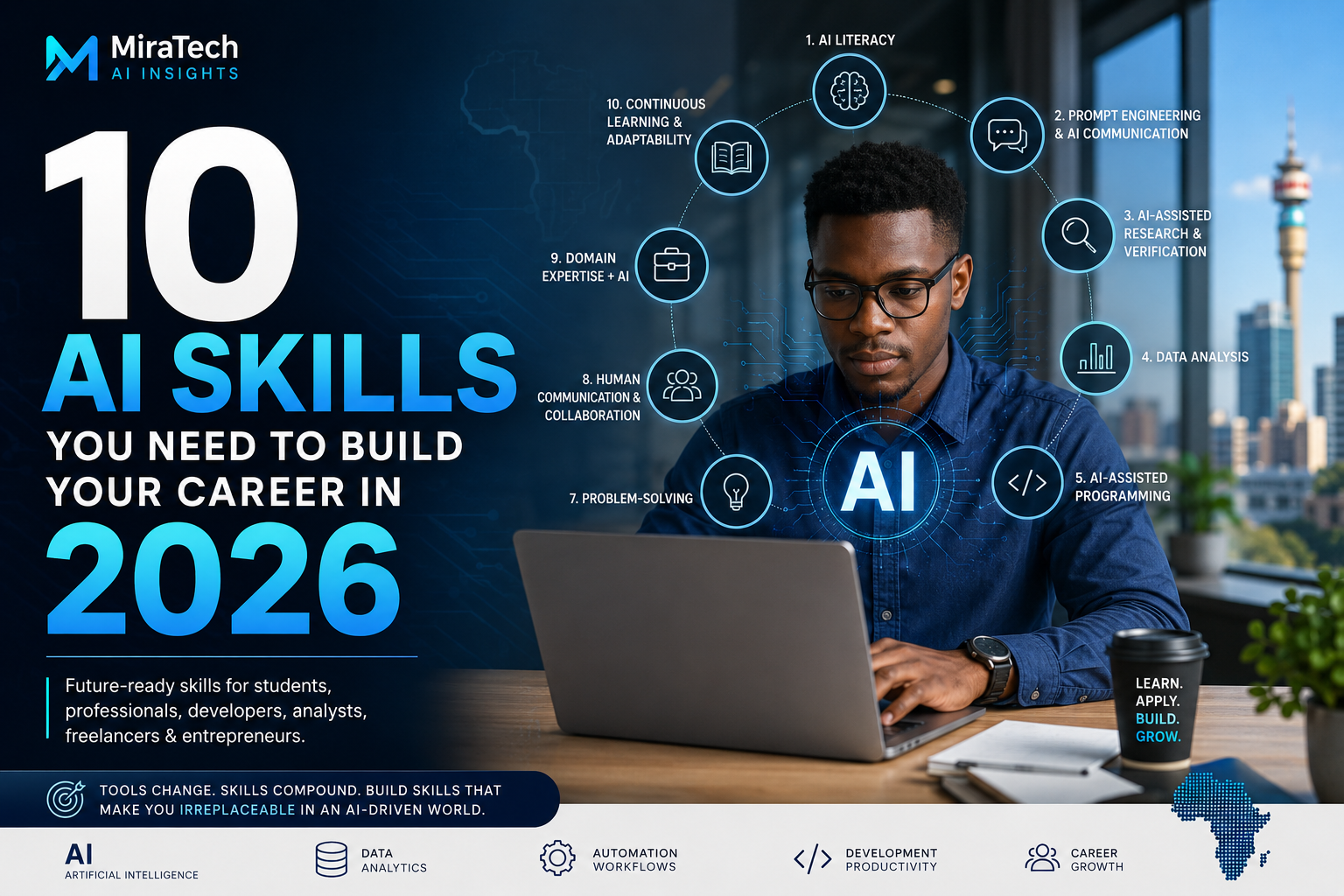
This guide covers 10 practical AI skills that can strengthen your career in 2026, whether you are a student, developer, data analyst, freelancer, entrepreneur, or experienced professional.
What Are AI Skills for Career Growth?
AI skills are the abilities that help you use artificial intelligence effectively in your work. They go far beyond technical AI development.
For example, an AI-skilled professional knows how to:
- Write clear, effective prompts
- Verify AI-generated information
- Analyze data with AI assistance
- Use AI for programming and automation
- Apply AI to their specific industry
Most importantly, AI skills focus on outcomes, not tools.
You don’t need to learn every AI application that exists. You need skills that stay useful when the tools change.
Tools change. Skills compound.
1. AI Literacy
The first AI skill you should develop is AI literacy — understanding what AI can do, where it fails, and how to use it responsibly.
You don’t need an engineering background. However, you should understand concepts like:
- Generative AI and large language models
- AI hallucinations and limitations
- Data privacy and bias
- Responsible AI use and human oversight
One of the most important lessons is this: AI can produce a confident answer that is still wrong. It may cite incorrect sources, give outdated information, or fabricate references entirely.
That is why AI literacy starts with healthy skepticism, not blind trust.
How to develop AI literacy
Start by using one or two AI assistants regularly. Try ChatGPT, Claude, Gemini, or Microsoft Copilot.
Don’t just read the output. Study it.
Ask yourself:
- What did AI do well here?
- Where could this be wrong?
- What should I verify before using this?
That habit builds practical AI literacy faster than any course.
2. Prompt Engineering and AI Communication
AI cannot understand your goals unless you communicate them clearly.
That makes prompt engineering a valuable AI career skill — but not in the way most people think.
Good prompting means giving an AI system enough information to understand the role, the task, the context, the desired output, and any constraints.
Weak prompt
Write a CV for me.
Strong prompt
Act as a career advisor for entry-level technology professionals. Create a one-page CV for a recent Computer Science graduate applying for junior data analyst roles. Highlight SQL, Python, Excel, and Power BI. Use concise, achievement-focused bullet points. Do not invent qualifications or experience.
The second prompt gives context and clear expectations. The output is significantly better.
But effective prompting is not about finding one perfect prompt. It is about iteration — asking AI to improve an answer, identify weaknesses, or adapt the result for a different audience.
Practical exercise
Take one task you do every week, such as writing reports. Write three different prompts for that same task. Compare the results. Then improve your best prompt.
AI communication is a skill that gets better with practice.
3. AI-Assisted Research and Information Verification
AI can make research much faster. You can use it to summarize documents, explain unfamiliar concepts, organize notes, generate outlines, and compare ideas.
However, speed creates a risk.
You may become faster at producing information without becoming better at verifying it.
That is why information verification is an essential AI skill for career growth.
When accuracy matters — and it usually does — check the original source. Verify:
- Statistics and dates
- Quotes and references
- Technical and legal claims
- Company and financial information
A reliable research workflow looks like this:
AI → Source → Verify → Think → Use
Not this:
AI → Copy → Publish
AI should accelerate your research. It should not replace your judgment.
4. Data Analysis
AI can analyze data quickly. That does not make data skills less important. If anything, analytical thinking becomes more valuable because professionals must evaluate AI-generated conclusions.
Imagine an AI tells you:
“Sales increased because of the new marketing campaign.”
Before accepting that conclusion, ask:
- What data supports it?
- What time period was analyzed?
- Were there other factors involved?
- Is the relationship causal or simply correlated?
These questions require analytical thinking that AI cannot provide for you.
Useful data skills include:
- Excel and SQL
- Python for data analysis
- Power BI and data visualization
- Statistics and critical interpretation
A data analyst might use AI to generate a SQL query. But the analyst still needs to know whether that query actually answers the business question.
AI can help analyze data. You need to understand what the data means.
5. AI-Assisted Programming
Developers now have access to capable AI coding assistants that can generate code, explain unfamiliar functions, debug errors, write tests, and create documentation.
However, AI-generated code is not automatically production-ready.
Developers still need strong knowledge of:
- Software architecture and security
- APIs, databases, and performance
- Testing, debugging, and code quality
For example, an AI assistant might generate a working authentication system. But a developer still needs to review whether that implementation has security weaknesses.
The valuable skill is not simply: “I can generate code with AI.”
It is: “I can use AI to develop software while understanding and controlling the engineering decisions.”
That distinction matters. AI should increase your productivity — not remove your judgment.
6. AI Automation and Workflows
Another high-value AI career skill is learning how to automate repetitive work.
Many professionals spend hours on tasks that follow predictable patterns — receiving a form submission, categorizing a request, notifying a team, sending a follow-up. These workflows can often be automated.
Tools like n8n, Zapier, and Make connect applications and automate processes. AI adds another layer by handling tasks that require language or classification.
For example, an automated workflow could:
- Receive a customer message
- Use AI to classify the request
- Store the information
- Route it to the right team
- Prepare a draft response
- Notify the customer
Other common use cases include email classification, lead organization, report generation, document processing, and content workflows.
The key is to start with the problem, not the tool.
Ask: Which repetitive task is wasting time every week? Then determine whether automation can solve it.
7. Problem-Solving
Problem-solving may be the most underrated AI skill for career growth.
Many people start by asking: “Which AI tool should I use?”
A better question is: “What problem am I actually trying to solve?”
Imagine a business owner says: “I need an AI chatbot.”
Before recommending one, dig deeper:
- What questions are customers actually asking?
- Where are those questions handled today?
- Does the company have reliable information to draw from?
- Could a better FAQ page solve this problem instead?
The real issue might be that customers simply cannot find information on the website. A chatbot may not be the answer at all.
Don’t start with the AI tool. Start with the problem.
That principle can save you time, money, and unnecessary complexity.
8. Communication and Collaboration
AI is becoming more capable. But communication remains essential.
Professionals still need to explain ideas, write clearly, present findings, work with teams, and build relationships with clients.
AI can help with many of these activities. You can ask AI to:
- Improve a business email or proposal
- Summarize meeting notes
- Simplify a technical explanation
- Prepare interview practice questions
- Draft a first version of a document
But AI does not replace the relationships between people.
A freelancer still needs to understand the client. A developer still needs to communicate with the team. A data analyst still needs to explain findings to decision-makers.
Think of AI as a communication assistant.
Use AI to improve your communication — not to avoid communicating.
9. Domain Expertise Combined with AI
One of the strongest combinations available today is AI plus domain expertise.
Consider the possibilities:
- AI + Healthcare
- AI + Finance
- AI + Education
- AI + Marketing
- AI + Data Analytics
- AI + Software Development
Domain experts understand real problems. A healthcare professional understands clinical workflows. A teacher understands classroom challenges. A marketer understands what customers need.
AI provides powerful capabilities. Domain expertise helps determine where those capabilities create meaningful value.
You don’t need to leave your profession because AI is growing. Instead, ask:
How can AI make me better at what I already know?
That question leads to some of the most valuable career opportunities available in 2026.
10. Continuous Learning and Adaptability
AI changes quickly.
New models appear. Existing tools gain new features. New workflows emerge. Some tools become less relevant.
Trying to master every AI tool is not a realistic career strategy.
Instead, develop adaptability — the ability to learn the next tool when it arrives.
Follow a few reliable technology sources. Experiment with new tools occasionally. Build small projects. Read documentation when you need to.
Most importantly, focus on transferable skills:
- Analyzing problems
- Working with data
- Automating workflows
- Communicating clearly
- Verifying information
- Evaluating AI outputs
These capabilities will remain useful long after today’s specific tools are replaced.
Tools change. Skills compound.
How to Start Building AI Skills in 30 Days
You don’t need months of study before you start applying AI. A focused four-week plan can build real momentum.
Week 1 — Learn AI Fundamentals and Prompting
Spend 30 to 45 minutes each day learning how AI assistants work. Focus on AI capabilities, limitations, hallucinations, prompting, and responsible use. Choose one or two AI assistants and stick with them.
Week 2 — Practice AI-Assisted Research
Choose a real task from your studies or work. Use AI to research a topic, summarize information, organize notes, or improve a document. Then verify the important information. The goal is to understand where AI helps and where human judgment matters.
Week 3 — Learn Data or Automation
Choose one path based on your career goals.
Data path: Start with Excel, then SQL, then Python, then Power BI. Choose a small dataset and answer real questions with it.
Automation path: Choose one repetitive workflow and experiment with n8n, Zapier, or Make. Keep it simple. The goal is to understand workflow logic.
Week 4 — Build One Practical Project
Build something small. A student might create an AI-assisted research workflow. A job seeker might build a system that compares a CV with a job description. A freelancer might automate client onboarding. A developer might build a small AI-powered application.
Then document your project. Explain the problem, your solution, the tools used, what AI handled, what you handled, and what you learned.
That project can become part of your portfolio.
AI Skills Are About More Than AI Tools
There is a common mistake when people start learning AI. They focus too much on the tools.
They ask: “Which AI tool should I learn?”
The better questions are:
- Can you identify a real problem?
- Can you communicate clearly?
- Can you analyze information critically?
- Can you work with data?
- Can you verify AI outputs?
- Can you combine technology with domain knowledge?
- Can you keep learning as things change?
Those capabilities will remain valuable even after today’s AI tools are replaced by better ones.
That is why AI skills for career growth should be viewed as a long-term investment rather than a list of software applications to install.
Start with One Skill
You don’t need to learn everything about AI. You don’t need to become an AI engineer.
Choose the skills that match your goals.
- Developer? Focus on AI-assisted programming and automation.
- Data analyst? Strengthen data analysis and AI-assisted research.
- Student? Focus on AI literacy, prompting, research, and practical projects.
- Freelancer? Learn AI productivity and workflow automation.
- Entrepreneur? Focus on problem-solving, automation, and domain-specific applications.
The goal is not to replace your expertise. The goal is to extend it with AI.
Think of it this way:
Expertise + AI + Problem-Solving + Human Judgment = Stronger Career Capability
Start with one skill. Practice it. Build something. Then learn the next one.
Your career doesn’t need more AI hype. It needs practical AI capability.
Final Thoughts
Artificial intelligence is becoming a standard part of the modern professional toolkit.
But the most valuable AI career skills are not about knowing which chatbot launched last week. They are about understanding AI deeply enough to use it well — verifying its outputs, combining it with domain expertise, and applying it to real problems.
You don’t need to learn everything.
Choose the skills that match your goals. Practice them consistently. Build real projects. Document what you learn. Keep adapting as the technology evolves.
Because the tools will change.
Your skills can compound.
What AI skill are you planning to develop next? Share your answer in the comments.
Follow MiraTech for practical insights on AI, technology, data, automation, and digital careers.
Frequently Asked Questions
What are the most important AI skills for career growth in 2026?
The most important AI skills include AI literacy, prompt engineering, AI-assisted research and verification, data analysis, AI-assisted programming, workflow automation, problem-solving, communication, domain expertise combined with AI, and continuous learning.
Do I need programming skills to develop AI career skills?
No. Many valuable AI skills do not require programming. However, programming, data analysis, and automation are strong additions if they match your career goals.
Is prompt engineering still a valuable AI skill?
Yes — but treat it as part of a broader set of AI communication skills rather than a standalone technique. Effective AI communication means providing context, defining goals clearly, evaluating outputs critically, and iterating on results.
How can students build AI skills for career growth?
Students can start by learning AI fundamentals, practicing prompting, using AI for research responsibly, developing basic data skills, and completing small AI-assisted projects they can include in a portfolio.
Which AI tools should beginners learn first?
Start with one or two general AI assistants, such as ChatGPT, Claude, Gemini, or Microsoft Copilot. Then add specialized tools based on your career direction. Learning transferable skills matters more than learning every available tool.
How do AI skills contribute to long-term career growth?
AI skills help professionals improve productivity, analyze information faster, automate repetitive work, develop software more efficiently, and solve problems more effectively. Their value increases significantly when combined with strong domain expertise and sound human judgment.